What Is a Low Profile CPU Cooler?
A Low Profile Cpu Cooler is a compact heatsink-and-fan assembly designed to fit where a standard tower cooler may be too tall. Its low height suits small-form-factor computers, slim cases, and builds with limited clearance around the processor. Instead of a tall stack of fins, many models use a broad, shallow heatsink with a fan mounted above or beside it. The result is a cooler that can fit beneath a tight side panel. Every millimeter can matter.
Before choosing one, check the case’s maximum CPU cooler height and the motherboard layout. Measure available clearance near memory modules, graphics cards, and the case panel. A cooler may meet the height limit yet still block a RAM slot or crowd nearby components. Small differences are easy to overlook. Manufacturer specifications are useful, but verify the measurements against your actual case and board.
Low-profile designs can handle everyday workloads, but their cooling capacity varies by model, processor, and airflow. A small fan may spin faster under sustained load, creating more noticeable noise. That trade-off is not automatic; fan curves and case ventilation also matter. A cooler’s listed compatibility does not guarantee quiet operation or ideal temperatures in every build. This guide explains how these coolers work, where they fit, and which specifications deserve attention. It also considers the limits. A compact cooler can be the right choice, but it is not a shortcut around careful sizing, airflow, or realistic expectations.
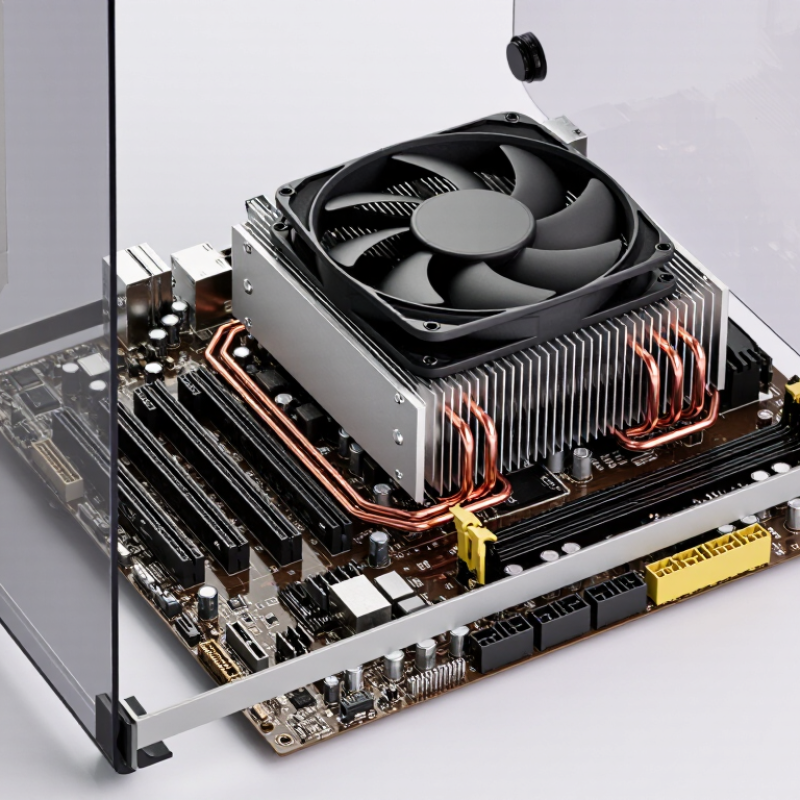
Definition and Purpose of a Low-Profile CPU Cooler
A low-profile CPU cooler is a compact heatsink-and-fan assembly designed to cool a processor where vertical space is limited. Its height is reduced compared with many standard tower coolers, though “low-profile” has no single universal measurement. Always compare the cooler’s dimensions with the case’s stated CPU-clearance limit. A few millimeters matter.
Its main purpose is to make cooling possible in small desktop cases, slim home-theater PCs, and other space-constrained builds. Many models use a flat, top-down layout: the fan pushes air through the heatsink toward the motherboard. This can also move air around nearby components, such as memory modules. Check their clearance, too. A compact cooler may fit beside them, but not above every memory stick.
Low height comes with trade-offs. A smaller heatsink and fan may have less capacity to remove heat, especially under sustained workloads or with a high-power processor. Fan noise can become noticeable when temperatures rise. In practice, check the processor’s power limits, case ventilation, and cooler clearance before buying. Measure twice. Even then, airflow can behave differently once the case is closed, so monitor temperatures during a real workload.
Key Components and Compact Design
A low-profile CPU cooler is made for systems where a tall heatsink would collide with a case panel or nearby components. Its key parts are a metal contact base, a finned heatsink, a fan, and mounting hardware. Some models also use heatpipes to move heat from the base into the fins; simpler designs may not. The base must sit evenly against the processor, while the fins provide more surface area for heat to escape. The fan pushes air through that narrow stack. Space is tight.
Compact design involves more than reducing height. A wide fan or heatsink can still interfere with memory, cables, or the case wall. Before choosing a cooler, compare its full dimensions with the case’s clearance and check that its mounting hardware supports the processor socket. Also consider the processor’s heat output and the airflow available inside the case. Smaller coolers can work well in modest systems, but they may run louder or warmer under sustained heavy loads. I would not judge fit by height alone; small measurement gaps are easy to overlook, and real installations can be less tidy than diagrams suggest.
What Is a Low Profile CPU Cooler? - Key Components and Compact Design | Component or Feature | Purpose | Compact-Design Details | Practical Consideration |
| Low-profile heatsink | Transfers heat away from the CPU and releases it into the surrounding air. | Uses a shorter fin stack than a typical tower cooler. Low-profile designs are often roughly 30–70 mm tall, although there is no universal height cutoff. | Check the case’s CPU-cooler height limit; the cooler’s stated height should fit within that clearance. |
| Cooling fins | Increase the surface area available for heat transfer to moving air. | Fins are arranged within a shallow profile, often spreading outward over the motherboard rather than rising high above it. | Fin layout can affect access to nearby memory modules and motherboard components. |
| Base plate | Forms the contact surface that receives heat from the CPU’s integrated heat spreader. | A compact cooler typically uses a low-mounted base to keep the overall assembly short. | Correct mounting pressure and a suitable layer of thermal paste help establish effective contact. |
| Heat pipes (when included) | Move heat from the base to other parts of the heatsink using evaporation and condensation of an internal working fluid. | Pipes can route heat around a compact fin stack; some simpler designs do not use heat pipes. | Their number and arrangement vary by cooler design and do not alone determine cooling performance. |
| Fan | Moves air through or across the heatsink to carry heat away. | May be mounted above or beside the heatsink; a slim fan can help reduce total cooler height. | Fan speed, airflow, noise, and nearby obstructions all influence real-world results. |
| Mounting hardware | Secures the cooler to the motherboard and applies pressure between the base and CPU. | Designed to fit the cooler’s footprint and the relevant motherboard socket. | Confirm socket compatibility and follow the installation instructions before mounting. |
| Overall clearance and airflow | Determine whether the cooler fits and can receive enough air to operate effectively. | The short height suits many small-form-factor cases, but the cooler still needs space around its fan and heatsink. | Check case clearance, memory height, motherboard layout, and case ventilation together. |
How Low-Profile CPU Cooling Works
A low-profile CPU cooler removes heat through a short, tightly packed path. Heat travels from the processor’s metal heat spreader into the cooler’s base, then through heat pipes or a solid metal block. Inside heat pipes, working fluid evaporates near the hot base and condenses along cooler fins. A fan pushes air across those fins and out through the case vents.
Small space, real trade-offs. A short fin stack has less surface area than a taller one, so airflow and fan speed matter. Restricted intake air can make the cooler work harder, often with more noise. ASHRAE’s 2021 Thermal Guidelines for Data Processing Environments recommend 18–27°C inlet air for specified equipment classes; that is room-air guidance, not a CPU temperature limit. It still illustrates why cool, unobstructed intake air helps. Keep cables clear of the fan and leave an open path to the case exhaust. The airflow diagram looks tidy on paper, but cramped cases can recirculate warm air. That detail is easy to miss.
Advantages and Limitations
A low-profile CPU cooler uses a short heatsink and fan to fit cases with limited vertical clearance. Its compact shape can free space around memory slots and make installation easier in small builds. It can also keep a system usable where a tall tower cooler would hit the case panel. But compact does not mean equally powerful.
The main limitation is thermal headroom. Smaller heatsinks have less surface area, and small fans may need to spin faster under sustained loads. That can mean more audible fan noise during gaming, rendering, or other demanding work. ASHRAE’s 2021 Thermal Guidelines recommend 18–27°C inlet air for common data-center equipment classes. This is an environmental reference, not a desktop-cooler performance rating; warm case air can still leave a compact cooler with less room to dissipate heat. Actual results depend on the processor, case airflow, and workload.
Tips: Check the cooler’s height against the case limit, then verify memory and motherboard clearance. Compare independent temperature and noise tests under sustained loads, not just brief benchmarks. A few degrees can matter. I would not judge performance from height alone; small-case airflow is easy to underestimate.
Case Compatibility and Cooler Selection Factors
A low-profile CPU cooler is designed for cases with limited vertical space, such as compact desktop systems. Its shorter height can solve a clearance problem, but it does not guarantee a straightforward fit. Check the case’s maximum cooler height and compare it with the cooler’s published dimensions. Measure carefully; side panels and nearby components can leave less room than expected. Leave a little clearance.
The cooler must also match the processor socket and avoid blocking memory slots or motherboard heatsinks. Wide memory modules can collide with a fan, while tall heatsinks near the processor may restrict the cooler’s position. Look at the motherboard layout and cooler dimensions together, not as separate specifications. A small paper mock-up can help reveal awkward clearances before installation.
Cooling capacity matters, too. Check the processor’s power requirements and consider how long it will run demanding tasks. In a tightly packed case, airflow may be limited, so a cooler that performs well in an open test setup might run warmer inside your system. Case fans and unobstructed vents make a noticeable difference. Noise is another trade-off: a small fan may need to spin faster under load. Compact does not always mean quiet. Compare independent temperature and noise measurements when available, and treat advertised performance as a guide rather than a promise.